Search the Library

Not sure where to start? View our helpful resources here on how to find the book you’re looking for.

Important Information

Library opening hours

Open Monday – Thursday 9:00 am to 5:00 pm

Closed Friday, Weekends and Public Holidays.

A code is required to enter the library.
For borrowers and visitors without a code, please contact the library prior to your visit, check-in at Reception by ringing the bell, or using the electronic Check-In station.

Contact information

Reception +61  8305 9350
Librarian  +61  8305 9307

Email: library@sbc.edu.au

Location

18 King William Road, North Adelaide 5006.

About SBC Library

The Library provides collections and access to resources which support the learning, teaching and research objectives of St Barnabas College in the context of University of Divinity membership and the collaborative provision of resources.

About Library & Membership

Here you will find information on how to access the library, sign in to your library account and manage your loans. For assistance, contact library@sbc.edu.au

An annual fee of $50 is payable to join the library as a borrower.

Membership is free to people who belong to one of the following groups:

  • SBC academic and operational staff
  • Students enrolled in:
    • University of Divinity degree programs
    • Audit courses
    • SBC courses
    • Staff and students enrolled in degree programs from other UD member colleges
    • Ordination Candidates
    • Alumni
    • SBC College and Diocesan Council members
    • SA Church Office staff
    • SA Ordained Clergy and active members of the Anglican Church of the Province of South Australia

Students:

If you are enrolled in a University of Divinity program, a library account will be created for you upon enrolment. For students enrolled in SBC programs, contact the library directly to obtain a library card.

Academic Staff:

All lecturing staff can borrow from the SBC library. Your account is created once your IT Systems Access Form has been processed. University of Divinity current staff and students can borrow from other University of Divinity partner colleges in South Australia by visiting the library in person with your University of Divinity ID card. Obtain a University of Divinity student/staff card Send a request with a JPEG passport style photograph to admin@sbc.edu.au. To register as a Community Borrower Contact the library by email library@sbc.edu.au to enquire about membership. Once your account has been created, you will receive a confirmation email. Membership cards can be picked up from the library. If a membership fee is charged, please contact the librarian to organise payment. Email library@sbc.edu.au

Renewals:

Sign in to your UD Library Hub account to renew your loans. Renewal limits can differ depending on your borrower status. In general, after the initial borrowing period, renewals happen in the following way:

  • First renewal: Automatically completed by the library system.
  • Second renewal: Manually completed by the borrower.
  • Third renewal: Contact the library from which the item was borrowed

Please be aware that an item cannot be renewed if:

  • it is requested by another user
  • it is restricted material
  • you have overdue loans
  • you have reached the maximum loan period.

REMEMBER: If you receive an overdue notice, or are unable to renew your items, contact library@sbc.edu.au or the library from where the item was borrowed.

Placing Holds:

Items can be placed on hold and collected from the library which holds the item.
To place a hold:

  • Ensure you are signed into your library account.
  • From your search results, click on the title of the item you are interested in.
  • From the expanded view, select the Place Hold option on the left-hand side of the screen.
  • The pick-up option/s will then be displayed.
  • To complete your hold, select Submit Request.

Borrowing Limits:

UD enrolled Students: Undergraduate, Graduate Certificate, or Diploma

  • 25 total items     
  • 3 weeks loan
  • 3 renewals (1st automatic)

UD enrolled Students: Doctorate, Master, & Honours

  • 25 total items     
  • 10 weeks loan
  • 2 renewals (1st automatic)

Academic & Adjunct Staff

  • 25 total items     
  • 10 weeks loan
  • 4 renewals (1st automatic)

Community & External borrowers

  • 20 total items     
  • 3 weeks loan
  • 2 renewals (1st automatic)

Community & External borrowers include SBC students and non-teaching staff, SBC College Council, Alumni, SA Church Office staff, SA Ordained Clergy and active members of the Adelaide Anglican Diocese.

Reserve items

  • 7-Day Loan Items:  5 items limit (Part of total item limit) & no renewals
  • Library Use Only:  Not available for overnight or long-term loan.

Main Collection items marked as Library Use Only, are not for loan.

Number of items: This is the maximum number of books which can be borrowed from all libraries which share the University of Divinity Library Hub.

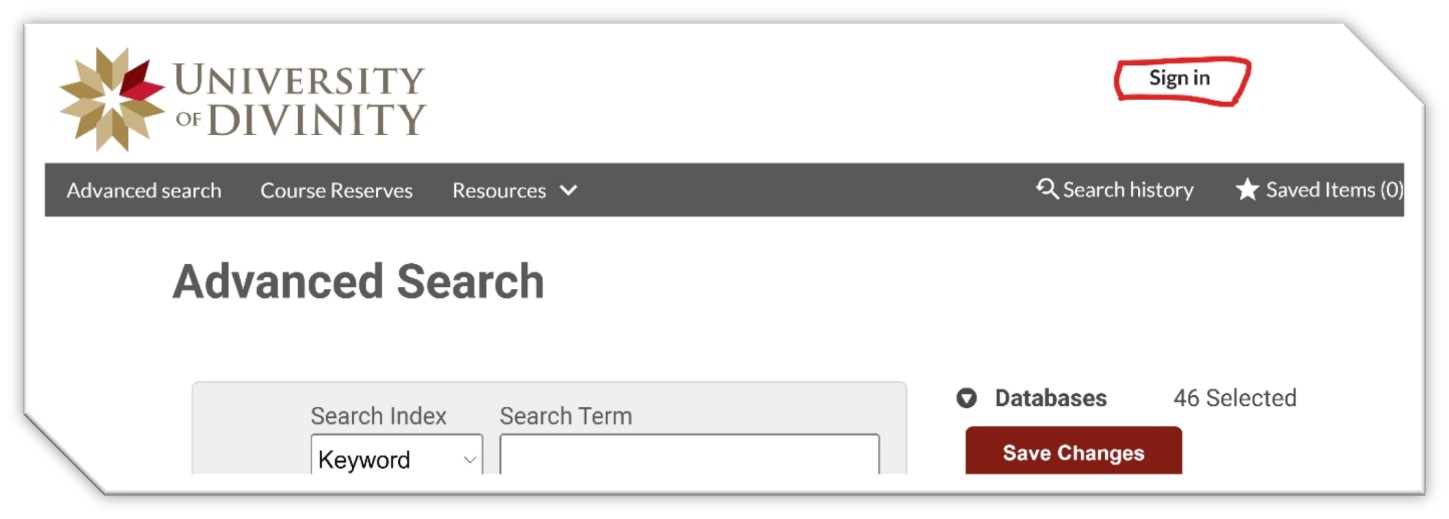
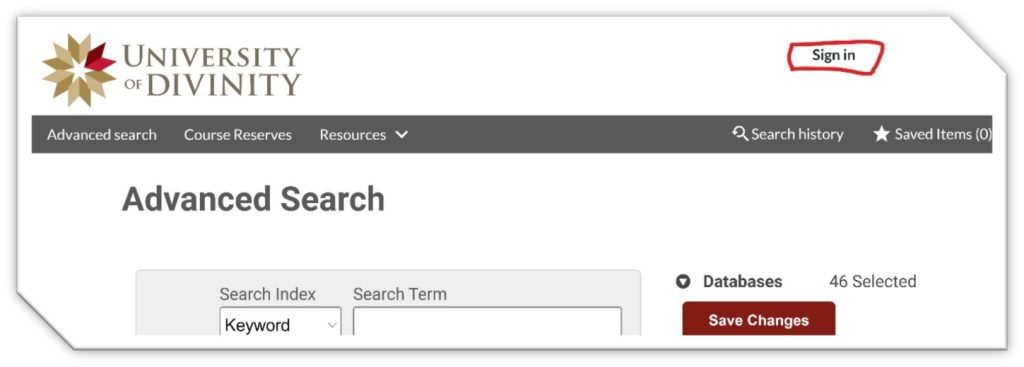
Use the Sign in button located above, or directly from the UD Library Hub catalogue’s Advanced Search screen  Advanced Search divinity.on.worldcat.org
The Sign-in button is in the top right corner of the webpage.
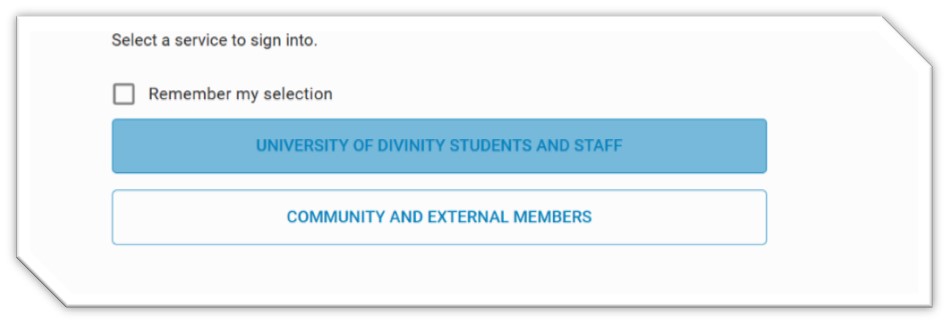
From the sign in page, choose the University of Divinity Students and Staff Option.
To sign-in use your Single Sign On login credentials which is the same as your ARK login.
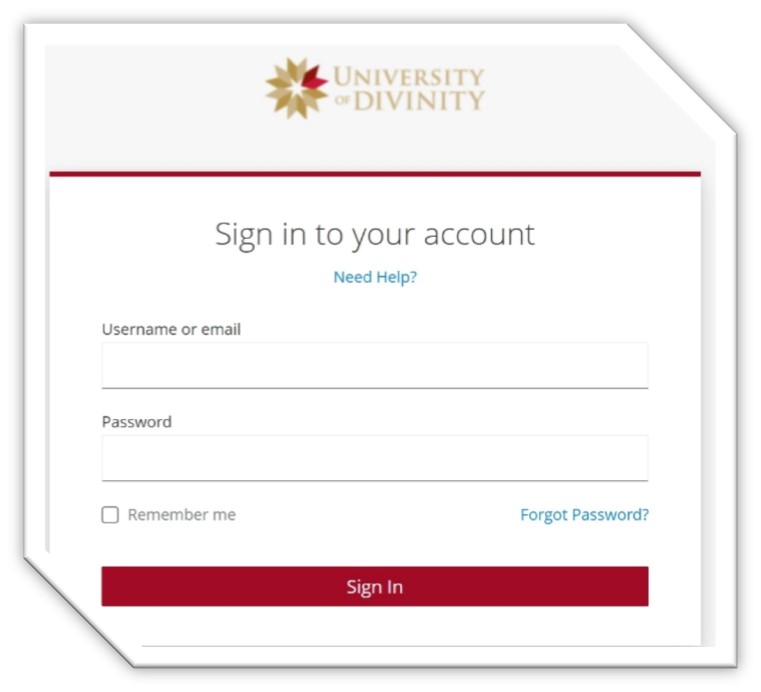
For more information visit the IT@UD webpage Login Guide | IT@UD (divinity.edu.au)

Use the Sign in button located above, or directly from the UD Library Hub catalogue’s Advanced Search screen  Advanced Search divinity.on.worldcat.org

From the Advanced Search Screen webpage, select the Sign-in button in the top right corner.
Choose the Community and External Members option.

To sign in, you will need to enter your Barcode and Password.

Your Barcode is the Borrower ID on your library card and your password.

If you are signing into your UD Library Hub account for the first time, you will need to follow the set your password instructions below.
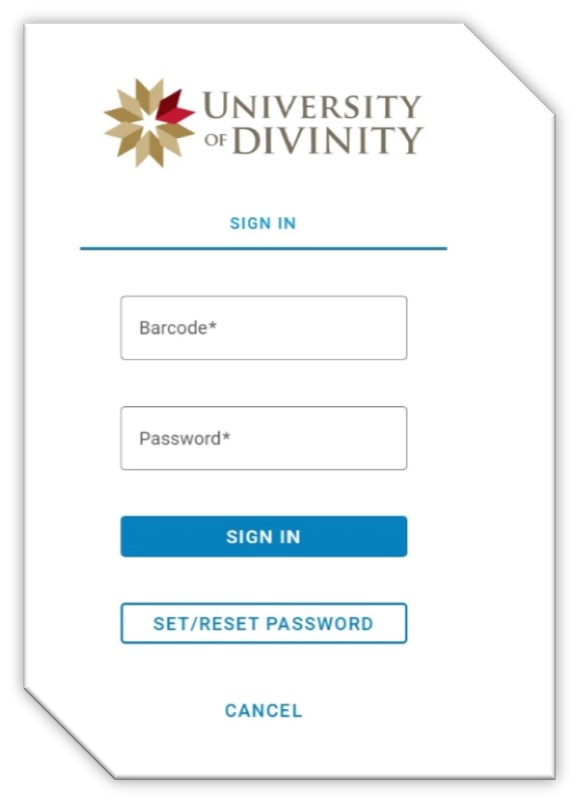
Set Your Password

To Set your Password choose the Set/Reset Password option located under the Sign In button. 

Enter your Barcode in the Request New Password field and you will receive an email. Ensure to check your Junk Mail folder. 

New Password email messages are only valid for 24 hours. 

Books held within the SBC Library can be found by searching the University of Divinity’s (UD) Library Hub.

How to Search

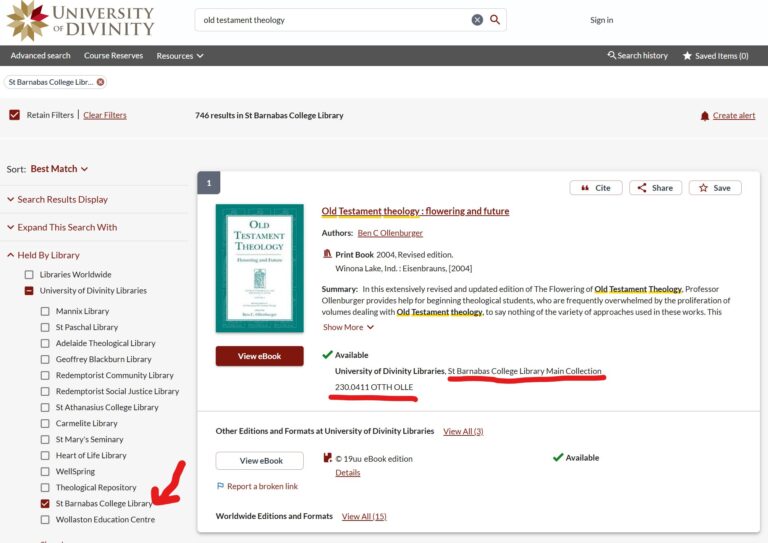
  • Visit the UD Library Hub and start by searching the catalogue.
  • In the Filter menu on the left side under the Held By Library tick the St Barnabas College Library check box
  • In the item’s record description, you will see that the book is held in the St Barnabas College Library’s Main Collection and the item details (Classification) showing where it is located on the shelf.
If you need assistance with signing into your library account visit https://sbc.edu.au/library/my-library-account/

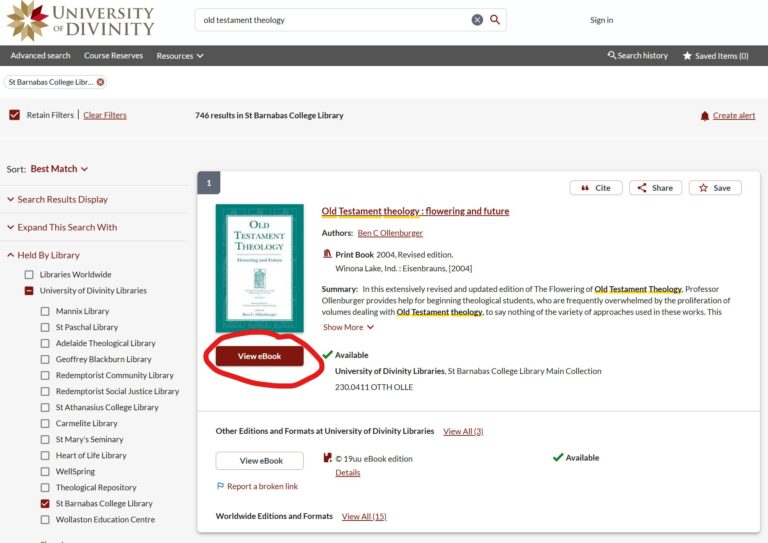
Access eBooks

eBook access is available to SBC Academic staff, and students enrolled in University of Divinity degree programs.

To access all University of Divinity subscription e-resources, you will need your ARK login details.
Be aware that not all eBooks visible on the Library Hub are available to view.

Look for records with the red View eBook button. These eBooks can be accessed in full text by staff and students.
SBC library does not offer a postal service for borrowing. All items become the responsibility of the borrower while on loan. Please do not remove books from the library without borrowing. Act on notifications which are sent from the library regarding loans. Return or renew items by the due date. If items are overdue, borrowing rights are blocked. Return items as soon as possible or contact the library to see if a renewal is possible. Please notify the Library if your contact details change. Academic staff and UD enrolled students must contact the SBC College Registrar to update contact details.

For lost or damaged items:

Contact the librarian as soon as possible if an item has been lost or damaged while on loan to you.

St Barnabas College students and staff can request scans from items only held in hard copy in the library.

All requests must comply with the Australian copyright regulations, as a general rule this means up to one (1) whole chapter, one (1) whole journal article, or 10% of a library resource (whichever is less) can be provided.

Submitting this form constitutes a request by a library client under section 49(1) of the Copyright Act 1968.

UD’s Library Hub is powered by WMS which is a system that enables you to search for electronic resources and the print resources of the UD partner college libraries that contribute their holdings to the shared catalogue. These libraries are known as the University of Divinity WMS libraries.

Library Hub Guide https://library.divinity.edu.au/library-hub-guide.html

Getting Started With Assignments https://library.divinity.edu.au/library-hub-guide-getting-started-on-your-assignments.html

Guide to Referencing https://library.divinity.edu.au/styleguide.html

Need help?

If you need help using UD resources, firstly contact your home college library.  SBC students and staff email the library at library@sbc.edu.au

Using the library collections

The best way for you to find items in the library is to search the catalogue. Check the item’s availability and note the location and classification number before searching the shelves. As a rule, you will find items belonging to one of the following collections:

Main Collection

Most items in this collection can be borrowed for 21 days. Exceptions to this are Library Use Only books which are Not for Loan.

Compactus

The Compactus is located near the library printer and contains extra resources which can be borrowed. Any items with Compactus as a collection prefix can be found in this area. This includes items in Compactus-Journals.

Compactus

The Compactus is located near the library printer and contains extra resources which can be borrowed. Any items with Compactus as a collection prefix can be found in this area. This includes items in Compactus-Journals.

Reserve

The items in the Reserve collection are in high demand and belong to one of two categories; Library Use Only or 7-day loan.

  • The items in the Reserve collection are in high demand and belong to one of two categories; Library Use Only or 7-day loan.
  • 7-Day Loan Lecturers can request to have high use items placed on 7-day loan to ensure fair use. These high demand items must be returned by the due date for other students to access.
Scanning Requests

Frequently Asked Questions

Community borrowers must register to borrow from the library. Please contact library@sbc.edu.au to enquire about membership. UD enrolled students and SBC staff accounts are automatically created upon enrolment. How do I sign in to my library account? For instructions on how to sign in, visit our Library page.

For instructions on searching for SBC library books in the UD Library Hub catalogue, visit our resources.

Students and staff can request a copy by filling in the Library Scanning Request form.

Yes, SBC staff and current students who are enrolled in a University of Divinity program have reciprocal borrowing rights with other University of Divinity partner colleges in South Australia. Visit the library in person with your University of Divinity ID card.

Send a request with a JPEG passport style photograph to admin@sbc.edu.au

Want to search the entire University of Divinity Catalogue?

Other Information